> ## Documentation Index
> Fetch the complete documentation index at: https://ownpay.org/docs/llms.txt
> Use this file to discover all available pages before exploring further.

> ## Agent Instructions
> OwnPay is licensed under AGPL-3.0 and is completely free - no licensing fees.
> Production docs URL: https://ownpay.org/docs - append .md to any page URL for clean markdown.
> OwnPay requires PHP 8.3+, MySQL/MariaDB, and Redis.
> MCP server available at https://ownpay.org/docs/mcp for programmatic documentation queries.
> Use root-relative links (e.g. /quickstart) for internal navigation - do NOT include /docs prefix.
> Plugin development: consult /developer/plugin-types/ pages for correct interfaces and manifests.

# OwnPay - Self-Hosted Payment Orchestrator with 100+ Gateways

> Documentation home for OwnPay: open-source, self-hosted payment orchestrator with multi-brand support, 100+ gateways, white-label checkout, and REST APIs.

<Snippet file="llms-directive.mdx" />

<div className="homepage-container">
  <div className="homepage-hero">
    <div className="hero-content">
      <div className="hero-pill-badge">
        <Icon icon="circle-info" size={14} />

        <span>v0.2.0 Release Available</span>
      </div>

      <h1 className="hero-title">Self-hosted payments. Complete control.</h1>

      <p className="hero-description">
        Take absolute control of your transaction logs, eliminate third-party processing markups, manage multiple brands, and route payments through 100+ gateways from a server you fully own.
      </p>

      <div className="hero-actions">
        <a href="/docs/installation" className="btn-primary">Get Started</a>

        <a href="/docs/api-reference/merchant" className="btn-secondary">
          API Reference <span className="ml-1.5">→</span>
        </a>
      </div>
    </div>

    <div className="hero-visual">
      <div className="gateway-router-card">
        <div className="router-header">
          <div className="status-indicator">
            <span className="pulse-dot" />

            <span className="status-text">OwnPay Router Online</span>
          </div>

          <div className="router-title">pay.yourbrand.com</div>
        </div>

        <div className="router-body">
          <div className="route-flow">
            <div className="flow-node">
              <Icon icon="user" size={16} />

              <span>Customer</span>
            </div>

            <div className="flow-arrow">➔</div>

            <div className="flow-node active-node">
              <Icon icon="shield-check" size={16} />

              <span>OwnPay Gateway</span>
            </div>

            <div className="flow-arrow">➔</div>

            <div className="flow-node">
              <Icon icon="landmark" size={16} />

              <span>bKash Wallet</span>
            </div>
          </div>

          <div className="gateway-list">
            <div className="gateway-item">
              <div className="gateway-info">
                <span className="gateway-dot status-active" />

                <strong>Stripe (Cards)</strong>
              </div>

              <span className="gateway-badge">USD, EUR</span>
            </div>

            <div className="gateway-item">
              <div className="gateway-info">
                <span className="gateway-dot status-active" />

                <strong>bKash (Mobile)</strong>
              </div>

              <span className="gateway-badge">BDT</span>
            </div>

            <div className="gateway-item">
              <div className="gateway-info">
                <span className="gateway-dot status-active" />

                <strong>Nagad (Mobile)</strong>
              </div>

              <span className="gateway-badge">BDT</span>
            </div>
          </div>
        </div>
      </div>
    </div>
  </div>

  <div className="checkpoints-bar">
    <div className="checkpoint-item">
      <Icon icon="circle-check" size={16} className="checkpoint-icon" />

      <span>Deploy on any server</span>
    </div>

    <div className="checkpoint-item">
      <Icon icon="circle-check" size={16} className="checkpoint-icon" />

      <span>No transaction fees</span>
    </div>

    <div className="checkpoint-item">
      <Icon icon="circle-check" size={16} className="checkpoint-icon" />

      <span>100% data ownership</span>
    </div>
  </div>

  <div className="section-header">
    <h2 className="section-title">Everything in one platform</h2>
    <p className="section-subtitle">Avoid vendor lock-in with a modular payment architecture designed for complete ownership.</p>
  </div>

  <div className="bento-grid">
    <div className="bento-card bento-col-span-2">
      <div>
        <div className="bento-card-icon">
          <Icon icon="network" size={20} />
        </div>

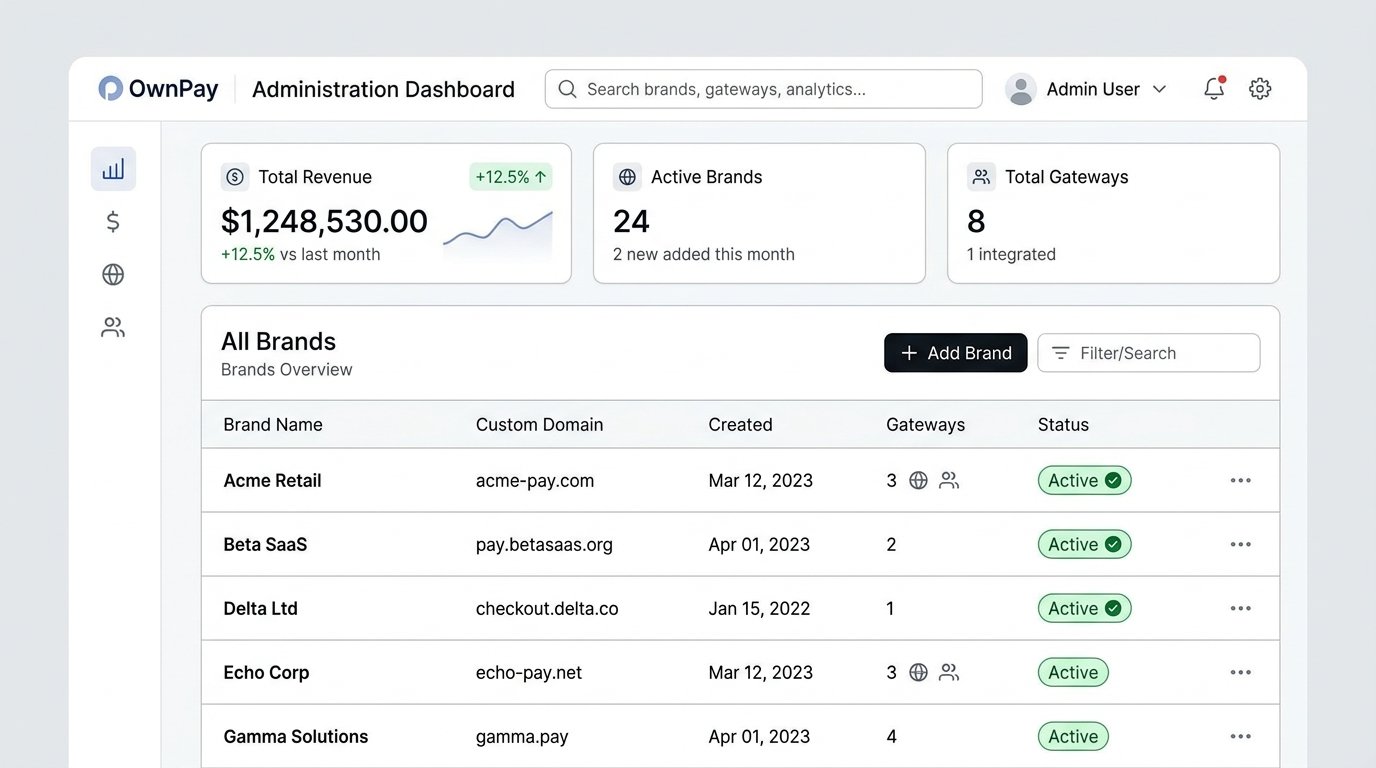
        <h3 className="bento-card-title">Multi-brand dashboard</h3>

        <p className="bento-card-desc">
          Run hundreds of independent stores, brands, or local merchants from a single OwnPay instance. Each brand maintains its own isolated database scope, payment methods, staff privileges, customer registry, and customized checkout domains.
        </p>

        {/* Mock dashboard image visual representation */}
        <img src="https://mintcdn.com/ownpay/J5p9jns8HKvogqYE/dashboard.jpg?fit=max&auto=format&n=J5p9jns8HKvogqYE&q=85&s=a47bd78d99c1d78294cecd65e21714d5" alt="OwnPay Multi-brand Administration Dashboard" className="rounded-lg border border-gray-200 dark:border-slate-800 mt-5 w-full shadow-sm" width="1376" height="768" data-path="dashboard.jpg" />
      </div>
    </div>

    <div className="bento-card">
      <div>
        <div className="bento-card-icon">
          <Icon icon="credit-card" size={20} />
        </div>

        <h3 className="bento-card-title">100+ Gateways</h3>

        <p className="bento-card-desc">
          Connect to global credit cards, local mobile wallets, bank accounts, and alternative currencies. Supported processors include Stripe, PayPal, bKash, Nagad, GCash, bank transfers, and local payment channels.
        </p>
      </div>
    </div>

    <div className="bento-card">
      <div>
        <div className="bento-card-icon">
          <Icon icon="globe" size={20} />
        </div>

        <h3 className="bento-card-title">White-label checkout</h3>

        <p className="bento-card-desc">
          Provide customers with smooth checkout flows hosted under your custom domains, featuring matching logos, brand-specific emails, and local currencies. Complete control over CSS variables, logos, and custom templates.
        </p>
      </div>
    </div>

    <div className="bento-card bento-col-span-2">
      <div>
        <div className="bento-card-icon">
          <Icon icon="scale" size={20} />
        </div>

        <h3 className="bento-card-title">Immutable double-entry ledger</h3>

        <p className="bento-card-desc">
          Ensure financial accuracy and automated reconciliation. OwnPay records every transaction, refund, dispute, and settlement adjustment as a double-entry ledger balance transaction, protecting your business from audit failures or accounting mismatches.
        </p>
      </div>
    </div>

    <div className="bento-card bento-col-span-2">
      <div>
        <div className="bento-card-icon">
          <Icon icon="puzzle-piece" size={20} />
        </div>

        <h3 className="bento-card-title">Extensible plugin architecture</h3>

        <p className="bento-card-desc">
          Add support for custom local gateways or dashboard extensions without modifying the core system. Built-in events and action hooks allow developers to build specialized gateway, theme, and utility plugins.
        </p>
      </div>
    </div>

    <div className="bento-card">
      <div>
        <div className="bento-card-icon">
          <Icon icon="smartphone" size={20} />
        </div>

        <h3 className="bento-card-title">Mobile companion app</h3>

        <p className="bento-card-desc">
          Verify mobile SMS verification payments automatically using the companion Android application linked to your server.
        </p>
      </div>
    </div>
  </div>

  <div className="section-header">
    <h2 className="section-title">Explore the documentation</h2>
    <p className="section-subtitle">Navigate through our comprehensive resources to set up, build, or deploy OwnPay.</p>
  </div>

  <div className="explorer-grid">
    <a href="/docs/user-guide/dashboard" className="explorer-card explorer-card-blue">
      <div className="explorer-icon-wrapper explorer-icon-blue">
        <Icon icon="book-open" size={18} />
      </div>

      <h3 className="explorer-title">Documentation</h3>
      <p className="explorer-desc">Explore the general user guide to manage brands, configure staff roles, view ledger verification logs, and customize checkout interfaces.</p>
    </a>

    <a href="/docs/api-reference/merchant" className="explorer-card explorer-card-green">
      <div className="explorer-icon-wrapper explorer-icon-green">
        <Icon icon="square-terminal" size={18} />
      </div>

      <h3 className="explorer-title">API Reference</h3>
      <p className="explorer-desc">Review specs for endpoints, authorization types, request schemas, webhook events, and sandbox parameters for merchant and mobile client calls.</p>
    </a>

    <a href="/docs/developer/quickstart" className="explorer-card explorer-card-purple">
      <div className="explorer-icon-wrapper explorer-icon-purple">
        <Icon icon="code" size={18} />
      </div>

      <h3 className="explorer-title">Developer Hub</h3>
      <p className="explorer-desc">Learn to build custom gateway plugins, use SDK wrappers, subscribe to event payloads, and write custom PHP integration triggers.</p>
    </a>

    <a href="/docs/concepts/index" className="explorer-card explorer-card-amber">
      <div className="explorer-icon-wrapper explorer-icon-amber">
        <Icon icon="layers" size={18} />
      </div>

      <h3 className="explorer-title">Core Concepts</h3>
      <p className="explorer-desc">Understand the underlying structure: data isolation models, payment state transitions, double-entry bookkeeping, and routing logic.</p>
    </a>

    <a href="/docs/resources/architecture" className="explorer-card explorer-card-navy">
      <div className="explorer-icon-wrapper explorer-icon-navy">
        <Icon icon="folder" size={18} />
      </div>

      <h3 className="explorer-title">Resources</h3>
      <p className="explorer-desc">Read system architecture design specifications, look up technical terms in the glossary, or configure local dev environments.</p>
    </a>

    <a href="/docs/user-guide/changelog" className="explorer-card explorer-card-pink">
      <div className="explorer-icon-wrapper explorer-icon-pink">
        <Icon icon="clock" size={18} />
      </div>

      <h3 className="explorer-title">Changelog</h3>
      <p className="explorer-desc">Track releases, dynamic update checks, signatures, database migrations, security patches, and version change logs.</p>
    </a>
  </div>

  <div className="section-header">
    <h2 className="section-title">Get started in minutes</h2>
    <p className="section-subtitle">Follow these sequential stages to establish your self-hosted payment environment.</p>
  </div>

  <div className="timeline-section">
    <Steps>
      <Step title="Deploy OwnPay">
        Upload the package files to your server or start the Docker container registry. Run the web-based installer to set up database connections. See [Installation](/installation).
      </Step>

      <Step title="Configure a brand">
        Create an independent brand workspace. Map custom domains and upload branding assets to personalize your hosted checkout portal. See [Brands](/user-guide/people/brands).
      </Step>

      <Step title="Link gateways">
        Link API keys for processing gateways (e.g. Stripe, PayPal) or connect local mobile processors like bKash or Nagad. See [Gateway Configuration](/user-guide/gateways/gateways).
      </Step>

      <Step title="Integrate and go live">
        Generate your secure platform API key and embed payment buttons, host invoices, or query the REST APIs directly. See [Developer Quickstart](/developer/quickstart).
      </Step>
    </Steps>
  </div>

  <div className="custom-footer">
    {/* Brand and Socials */}

    <div className="custom-footer-brand-row">
      <div className="custom-footer-brand">
        <div className="custom-footer-logo-row">
          <img src="https://mintcdn.com/ownpay/S70Th8VweRBV-OVo/logo/light.svg?fit=max&auto=format&n=S70Th8VweRBV-OVo&q=85&s=0c0e2df69a1c85bdc1297590e8be64c5" className="block dark:hidden" alt="OwnPay Logo" width="7034" height="1700" data-path="logo/light.svg" />

          <img src="https://mintcdn.com/ownpay/S70Th8VweRBV-OVo/logo/dark.svg?fit=max&auto=format&n=S70Th8VweRBV-OVo&q=85&s=9be8f7a4a0258f42abf703e80659f76b" className="hidden dark:block" alt="OwnPay Logo" width="7034" height="1700" data-path="logo/dark.svg" />
        </div>

        <p className="custom-footer-desc">
          Self-hosted payment orchestrator with multi-brand support, white-label domains, and 100+ payment gateways.
        </p>
      </div>

      <div className="custom-footer-socials">
        <a href="https://github.com/own-pay/OwnPay" target="_blank" className="custom-footer-social-link">
          <Icon icon="github" size={18} />

          <span className="sr-only">GitHub</span>
        </a>

        <a href="https://x.com/ownpayorg" target="_blank" className="custom-footer-social-link">
          <Icon icon="x" size={16} />

          <span className="sr-only">Twitter</span>
        </a>

        <a href="https://youtube.com/@ownpayorg" target="_blank" className="custom-footer-social-link">
          <Icon icon="youtube" size={18} />

          <span className="sr-only">YouTube</span>
        </a>

        <a href="https://facebook.com/ownpay.org" target="_blank" className="custom-footer-social-link">
          <Icon icon="facebook" size={18} />

          <span className="sr-only">Facebook</span>
        </a>
      </div>
    </div>

    {/* Link Grid */}

    <div className="custom-footer-grid">
      <div className="custom-footer-col">
        <h4 className="custom-footer-heading">Product</h4>
        <a href="/docs/quickstart" className="custom-footer-link">Quickstart</a>
        <a href="/docs/installation" className="custom-footer-link">Installation</a>
        <a href="/docs/resources/features" className="custom-footer-link">Features</a>
        <a href="/docs/resources/roadmap" className="custom-footer-link">Roadmap</a>
        <a href="/docs/user-guide/changelog" className="custom-footer-link">Changelog</a>
      </div>

      <div className="custom-footer-col">
        <h4 className="custom-footer-heading">Developers</h4>
        <a href="/docs/api-reference/merchant" className="custom-footer-link">API Reference</a>
        <a href="/docs/developer/quickstart" className="custom-footer-link">SDK Integration</a>
        <a href="/docs/developer/plugins/events" className="custom-footer-link">Webhooks</a>
        <a href="/docs/developer/plugins/overview" className="custom-footer-link">Plugins</a>
      </div>

      <div className="custom-footer-col">
        <h4 className="custom-footer-heading">Resources</h4>
        <a href="/docs/resources/architecture" className="custom-footer-link">Architecture</a>
        <a href="/docs/advanced-topics/security-compliance" className="custom-footer-link">Security</a>
        <a href="/docs/advanced-topics/faq" className="custom-footer-link">FAQ</a>
        <a href="/docs/resources/contributing" className="custom-footer-link">Contributing</a>
      </div>
    </div>

    {/* Bottom Bar */}

    <div className="custom-footer-bottom">
      <span className="custom-footer-copyright">
        © 2026 OwnPay. Licensed under AGPL-3.0.
      </span>
    </div>
  </div>
</div>


## Related topics

- [OwnPay: Open-Source Self-Hosted Payment Orchestrator](/docs/introduction.md)
- [OwnPay FAQ: Installation, Payments, and Plugin Answers](/docs/advanced-topics/faq.md)
- [Node.js SDK - TypeScript-First Payment Integration](/docs/developer/integration/nodejs.md)
- [OwnPay API Overview - REST API for Multi-Brand Payments](/docs/api/overview.md)
- [OwnPay Architecture: PHP Core, Middleware, and Plugins](/docs/resources/architecture.md)
